All testing performed in a controlled lab environment on personally owned hardware. Unauthorized access to computer systems is illegal under the Computer Fraud and Abuse Act (18 U.S.C. 1030) and equivalent laws in other jurisdictions. This content is for educational and defensive security research purposes only. Do not test against systems you do not own or have explicit written authorization to test.
This content represents personal educational work conducted in a home lab environment on personal equipment. It does not reflect the views, opinions, or positions of any employer or affiliated organization.
The first two episodes of this series were about what happens when there’s no lock on the door. Ollama serves models to anyone who knocks. Open WebUI’s Direct Connections feature hands a rogue model server the keys to your users’ browsers. Both stories follow the same logic: default open, attacker wins, episode over.
This one is different. This one is about doing things right.
By the end of Part I, a PII masking layer is deployed, configured, and verified to work when explicitly invoked. Names become <PERSON>. Emails become <EMAIL_ADDRESS>. Credit cards become <CREDIT_CARD>. The masking works. The logs confirm it.
What the logs also confirm – once you know where to look – is that Presidio never fired on a single real user request. Not once. The DLP layer exists. Real traffic never touches it. Part II explains how we found that out the hard way.
What We’re Building
Episodes 3.1 and 3.2 left us with Ollama and Open WebUI running on the LockDown host at 192.168.100.59. This episode adds the data protection layer on top of that existing stack:
| Component | Port | Role |
|---|---|---|
| Presidio Analyzer | 5001 | NLP-based PII entity detection |
| Presidio Anonymizer | 5002 | Token replacement – PII to <ENTITY_TYPE> |
| LiteLLM Proxy | 4000 | AI gateway – routes requests, enforces the Presidio guardrail |
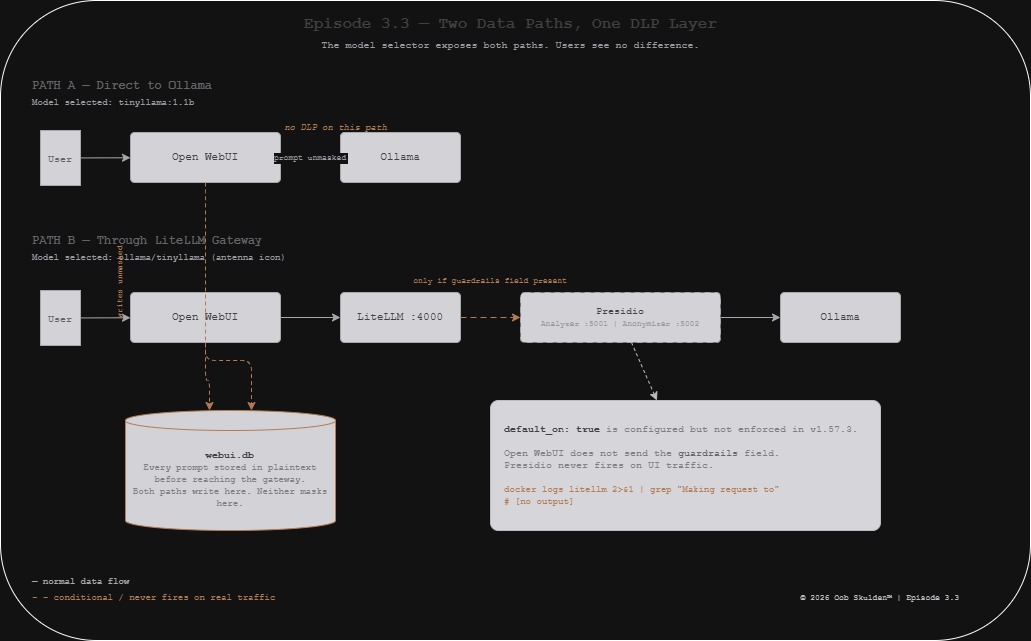
The design is clean. Open WebUI routes all model requests through LiteLLM instead of directly to Ollama. LiteLLM intercepts each prompt, calls Presidio to detect and replace PII, and forwards the cleaned version to Ollama. The model receives <US_SSN> instead of 123-45-6789. The user sees a normal conversation. Nothing sensitive reaches inference.
Before this episode:
Open WebUI --> Ollama (prompt unmasked)

After this episode:
Open WebUI --> LiteLLM --> Presidio [mask PII] --> Ollama (prompt masked)
That’s the design. Let’s build it.
Lab network:
- LockDown host (target):
192.168.100.59 - Docker network:
lab_default(confirmed viadocker network inspect) - All commands run on
192.168.100.59
What Presidio Actually Does
Before running a single docker pull, it’s worth being precise about what Presidio is and isn’t – because the distinction matters for everything that follows.
Presidio is Microsoft’s open-source PII detection and anonymization platform. It has two completely separate services.
Presidio Analyzer does detection only. It takes a string of text, runs it through NLP models, regex patterns, and rule-based recognizers, and returns a list of detected entities with their character positions and confidence scores. It does not modify the text. It does not redact anything. Its entire job is to say “there’s a PERSON at positions 11-24 with 85% confidence.”
Presidio Anonymizer does replacement only. It takes the original text plus the Analyzer’s detection results and applies an operator to each entity: MASK (replace with <ENTITY_TYPE>), REDACT (remove entirely), HASH, or ENCRYPT. It does not detect anything on its own. It needs the Analyzer’s output to know where to look.
They talk to each other over HTTP. LiteLLM calls both in sequence on every prompt – Analyzer first, Anonymizer second with the results. This two-step design is why the port numbers matter and why the internal Docker addresses are different from the host-mapped addresses.
Step 1: Deploy Presidio
Pull the official Microsoft images:
docker pull mcr.microsoft.com/presidio-analyzer:latest
docker pull mcr.microsoft.com/presidio-anonymizer:latest
Start the Analyzer:
docker run -d \
  --name presidio-analyzer \
  --network lab_default \
  -p 5001:3000 \
  -e PORT=3000 \
  -e WORKERS=1 \
  -e WORKER_CLASS=gevent \
  mcr.microsoft.com/presidio-analyzer:latest
Start the Anonymizer:
docker run -d \
  --name presidio-anonymizer \
  --network lab_default \
  -p 5002:3000 \
  -e PORT=3000 \
  -e WORKERS=1 \
  -e WORKER_CLASS=gevent \
  mcr.microsoft.com/presidio-anonymizer:latest
Three environment variables that Microsoft’s documentation does not mention but that are required for these containers to start correctly:
PORT=3000 – the entrypoint script (./entrypoint.sh) constructs Gunicorn’s bind address as 0.0.0.0:$PORT. Without this set, Gunicorn binds to 0.0.0.0: – an invalid address – and worker processes die silently before logging anything.
WORKERS=1 – tells Gunicorn to spawn one worker. Sufficient for the lab; reduces memory footprint.
WORKER_CLASS=gevent – switches Gunicorn from synchronous to async workers. The sync worker (default) deadlocks: it can only handle one request at a time, so when a health check arrives while the spaCy NLP models are still loading, the worker blocks indefinitely. Gevent workers handle both simultaneously.
You find these by reading /app/entrypoint.sh inside the container. They are not in the README, the Docker Hub page, or the Microsoft documentation.
Verify both services are up:
curl -s http://localhost:5001/health
# Presidio Analyzer service is up

curl -s http://localhost:5002/health
# Presidio Anonymizer service is up
Note: the health response is a plain string, not JSON. Don’t pipe it through python3 -m json.tool.
Smoke test – detection:
curl -s -X POST http://localhost:5001/analyze \
  -H "Content-Type: application/json" \
  -d '{
    "text": "My name is Sarah Johnson and my SSN is 123-45-6789",
    "language": "en"
  }' | python3 -m json.tool
Expected output:
[
  {
    "entity_type": "PERSON",
    "start": 11,
    "end": 24,
    "score": 0.85
  }
]
One entity – the name. The SSN is not detected. UsSsnRecognizer does not trigger on 123-45-6789 in the current image version, even with explicit context words. File this away – it comes up again in 3.3B.
Smoke test – masking:
curl -s -X POST http://localhost:5002/anonymize \
  -H "Content-Type: application/json" \
  -d '{
    "text": "My name is Sarah Johnson and my SSN is 123-45-6789",
    "analyzer_results": [
      {"entity_type": "PERSON", "start": 11, "end": 24, "score": 0.85}
    ],
    "anonymizers": {"DEFAULT": {"type": "replace", "new_value": ""}}
  }' | python3 -m json.tool
Expected output:
{
  "text": "My name is <PERSON> and my SSN is 123-45-6789"
}
Name masked. SSN sitting there in plaintext. The masking pipeline works correctly within its detection limits.
Step 2: Deploy LiteLLM
LiteLLM is the AI gateway. It exposes an OpenAI-compatible endpoint that proxies requests to Ollama while applying Presidio as a pre_call guardrail.
Create the config file:
sudo mkdir -p /opt/litellm

sudo tee /opt/litellm/config.yaml << 'EOF'
model_list:
  - model_name: ollama/tinyllama
    litellm_params:
      model: ollama/tinyllama:1.1b
      api_base: http://ollama:11434

  - model_name: ollama/qwen
    litellm_params:
      model: ollama/qwen2.5:0.5b
      api_base: http://ollama:11434

litellm_settings:
  drop_params: true

guardrails:
  - guardrail_name: "presidio-pii-mask"
    litellm_params:
      guardrail: presidio
      mode: "pre_call"
      default_on: true
      presidio_analyzer_api_base: "http://presidio-analyzer:3000"
      presidio_anonymizer_api_base: "http://presidio-anonymizer:3000"
      presidio_filter_scope: "input"
      pii_entities_config:
        PERSON: "MASK"
        EMAIL_ADDRESS: "MASK"
        PHONE_NUMBER: "MASK"
        US_SSN: "MASK"
        CREDIT_CARD: "MASK"
        US_BANK_NUMBER: "MASK"
        IP_ADDRESS: "MASK"
        LOCATION: "MASK"
EOF
Start LiteLLM:
docker run -d \
  --name litellm \
  --network lab_default \
  -p 4000:4000 \
  -v /opt/litellm/config.yaml:/app/config.yaml \
  -e LITELLM_MASTER_KEY=sk-litellm-master-key \
  -e PRESIDIO_ANALYZER_API_BASE=http://presidio-analyzer:3000 \
  -e PRESIDIO_ANONYMIZER_API_BASE=http://presidio-anonymizer:3000 \
  ghcr.io/berriai/litellm:main-v1.57.3 \
  --config /app/config.yaml --port 4000
Two important notes on this command.
The Presidio URLs appear in both the config file and as environment variables. This is not a mistake. LiteLLM v1.57.3 validates the environment variables exist at startup and crashes if they don’t – even if the values are already in the config file. The environment variables satisfy the startup validation. The config file values are what the guardrail actually uses at runtime.
The image tag is main-v1.57.3, not main-latest. The guardrails v2 syntax (guardrails: block in config) was introduced after v1.40.12. If you use v1.40.12, the guardrail block is silently ignored and Presidio never runs. v1.57.3 is the correct version for this configuration.
Verify LiteLLM:
curl -s http://localhost:4000/health/liveliness \
  -H "Authorization: Bearer sk-litellm-master-key"
# "I'm alive!"

curl -s http://localhost:4000/v1/models \
  -H "Authorization: Bearer sk-litellm-master-key" | python3 -m json.tool
Expected model list output:
{
  "data": [
    {"id": "ollama/tinyllama", "object": "model"},
    {"id": "ollama/qwen", "object": "model"}
  ],
  "object": "list"
}
Note: /health hangs in v1.57.3 while it probes backend models. Use /health/liveliness for a fast liveness check. Every LiteLLM endpoint requires the Authorization: Bearer header – including health endpoints.
Step 3: Test Masking Through the Gateway
Send a PII-containing prompt through LiteLLM and confirm Presidio intercepts it:
curl -s http://localhost:4000/v1/chat/completions \
  -H "Authorization: Bearer sk-litellm-master-key" \
  -H "Content-Type: application/json" \
  -d '{
    "model": "ollama/tinyllama",
    "messages": [
      {"role": "user", "content": "My name is David Martinez and my email is david.martinez@example.com. Say hello to me."}
    ],
    "guardrails": ["presidio-pii-mask"]
  }' | python3 -m json.tool
Check the LiteLLM logs to confirm what Presidio did:
docker logs litellm 2>&1 | grep "Making request to"
If Presidio fired, you’ll see:
Making request to: http://presidio-analyzer:3000/analyze
Making request to: http://presidio-anonymizer:3000/anonymize
If you see nothing – Presidio didn’t run. We’ll come back to which of those happened in Part II.
The definitive test is simple:
docker logs litellm 2>&1 | grep "Making request to"
Empty output means the DLP never fired. That’s what we got.
One important caveat visible in these commands: the "guardrails": ["presidio-pii-mask"] field in the request body. This is required. The default_on: true setting in the config is parsed correctly and appears in the startup logs, but it does not cause the guardrail to fire on requests that don’t explicitly include this field. This is a confirmed bug in v1.57.3 – there’s an open GitHub issue. The practical consequence: any client that doesn’t include the guardrails field bypasses Presidio silently, with no error and no indication that masking didn’t happen.
Step 4: Connect Open WebUI to LiteLLM
The final step is adding LiteLLM as a Direct Connection in Open WebUI, making it available as a model source alongside local Ollama.
Open WebUI: Admin Settings, Connections, Manage Direct Connections, +
| Field | Value |
|---|---|
| URL | http://192.168.100.59:4000/v1 |
| Auth | Bearer |
| Key | sk-litellm-master-key |
Save. The model selector will now show both local Ollama models (tinyllama:1.1b, qwen2.5:0.5b) and LiteLLM-routed models (ollama/tinyllama, ollama/qwen). The LiteLLM models are identifiable by the antenna icon in the model dropdown.
This distinction matters more than it looks. Two models in the selector. Two completely different paths to Ollama. One goes through LiteLLM and Presidio. One goes directly to Ollama with nothing in between. From the user’s perspective they’re identical. From a DLP perspective they’re not.
What We Built
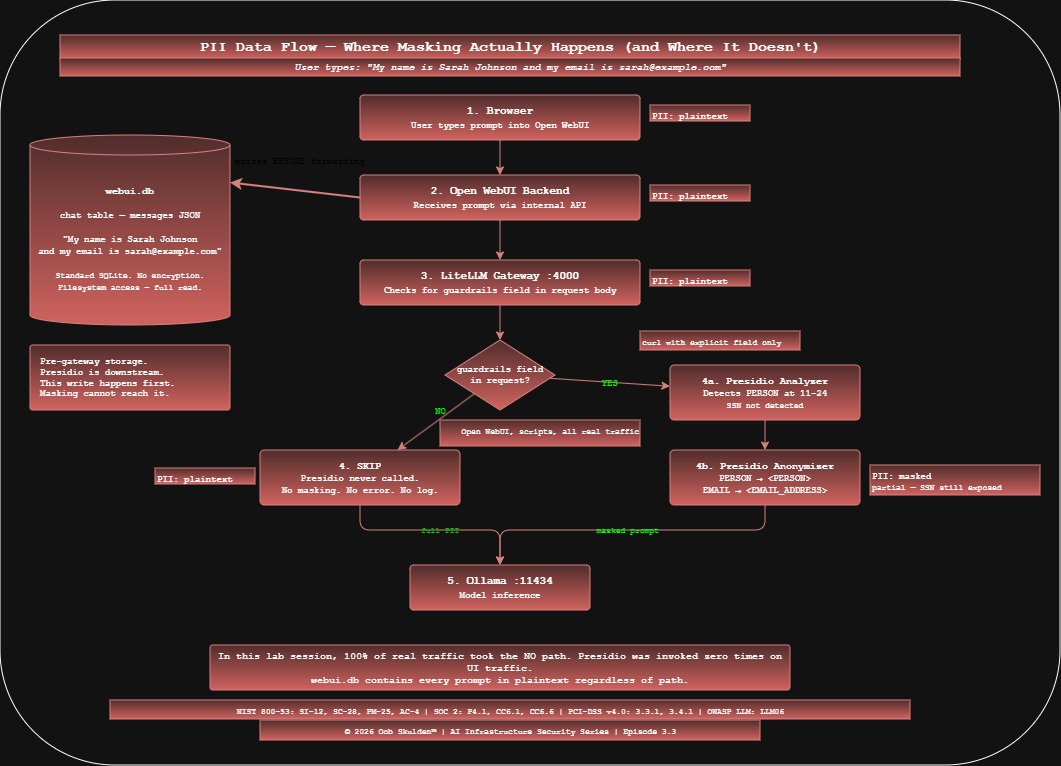
The data flow for a prompt containing PII now looks like this – when routed through LiteLLM:
User types: "My name is Sarah Johnson"
     |
Open WebUI frontend (browser)
     |
Open WebUI backend (stores in webui.db -- unmasked)
     |
LiteLLM gateway (port 4000)
     | -- only if guardrails field included in request
Presidio Analyzer -> detects PERSON at chars 11-24
     |
Presidio Anonymizer -> replaces with <PERSON>
     |
Ollama (receives: "My name is <PERSON>")
The masking layer is in place. When explicitly invoked via curl with the guardrails field, it works correctly. When traffic flows through Open WebUI – which is how every real user interacts with this stack – Presidio never runs.
If you were writing a compliance report today, you might document: Presidio PII masking deployed on AI gateway, pre_call mode, eight entity types configured, verified operational. What you might not document is the one-liner that proves it never actually protected anything:
docker logs litellm 2>&1 | grep "Making request to"
# [no output]
Empty. Presidio was never called. Not once. The gap is documented for 3.3B.
NIST 800-53: SI-12 (Information Management), SC-28 (Protection of Information at Rest), PM-25 (Minimization of PII) SOC 2: P4.1 (Personal Information Use), CC6.1 (Logical Access) PCI-DSS v4.0: Req 3.3.1 (Sensitive data retention), Req 3.4.1 (Stored data rendered unreadable) CIS Controls: CIS 3.1 (Data Management Process), CIS 3.11 (Encrypt Sensitive Data at Rest) OWASP LLM Top 10: LLM06 (Sensitive Information Disclosure)
All testing performed in a controlled lab environment on personally owned hardware. For educational and defensive security research purposes only.
© 2026 Oob Skulden™ | AI Infrastructure Security Series | Episode 3.3
Next: Episode 3.3B – The DLP is deployed. Here’s where the PII went anyway.
Part II: What We Actually Did – The Full Lab Session
The first half showed you how to build it. This half shows you what building it actually looks like – every wrong assumption, every silent failure, every moment of staring at four identical log lines wondering if the container is haunted. The failures are where the real education lives.
The Network Name Nobody Told You
Before a single container started, the build commands were already wrong.
The deployment plan used --network lockdown-net as the Docker network name. The actual network the existing Ollama and Open WebUI containers were on? lab_default. Named by Docker Compose after the directory the stack was originally launched from. Not documented anywhere.
docker network ls
# NETWORK ID     NAME          DRIVER    SCOPE
# b740b867de2f   bridge        bridge    local
# ef130f2ffd97   host          host      local
# 549668389b5b   lab_default   bridge    local  <- this one
# a4732b22af28   none          null      local
This matters because Docker container DNS only works within a network. Start Presidio on bridge while Ollama is on lab_default and LiteLLM can reach neither by container name. You get connection failures with no useful error, and you spend time debugging LiteLLM when the problem is a network flag.
Always confirm your existing network before deploying anything that needs to talk to it:
docker network inspect lab_default --format '{{range .Containers}}{{.Name}} {{end}}'
# open-webui ollama
Two containers confirmed. Now you can proceed with the right flag.
The Gunicorn Situation
The Presidio Analyzer start produced exactly four log lines and then complete silence:
Skipping virtualenv creation, as specified in config file.
[2026-03-17 01:57:35 +0000] [1] [INFO] Starting gunicorn 25.1.0
[2026-03-17 01:57:35 +0000] [1] [INFO] Listening at: http://0.0.0.0:3000 (1)
[2026-03-17 01:57:35 +0000] [1] [INFO] Using worker: sync
[2026-03-17 01:57:35 +0000] [1] [INFO] Control socket listening at /app/gunicorn.ctl
Health check returned nothing. Not a connection refused. Not a 404. Not an error. Just a curl hanging there waiting for a response that never arrived.
Memory wasn’t the problem – 6.6GB available. spaCy model loading wasn’t the problem – a worker process existed (visible in /proc) but had only 21MB of RAM, meaning it hadn’t started loading anything. The standard Gunicorn environment variables WORKERS, TIMEOUT, and LOG_LEVEL were all being ignored.
That last point was the tell. Reading the actual entrypoint script:
docker inspect mcr.microsoft.com/presidio-analyzer:latest \
  --format '{{json .Config.Entrypoint}}'
# ["./entrypoint.sh"]

docker exec presidio-analyzer cat /app/entrypoint.sh
# #!/bin/sh
# exec poetry run gunicorn -w "$WORKERS" -b "0.0.0.0:$PORT" "app:create_app()"
$PORT. Not a standard Gunicorn variable. A custom one the script expects. Without it, the bind string becomes 0.0.0.0: – an invalid address. The Gunicorn master starts successfully because it’s just setting up the socket infrastructure. Workers try to bind and die instantly before logging anything.
Setting PORT=3000 got a worker running. But the health check still hung. Different problem.
The worker existed but was sleeping with 21MB of RAM and a deleted socket file in its file descriptors. This is Gunicorn’s sync worker deadlock: the worker spawns and starts loading create_app(), which initializes the spaCy NLP models. This takes 20-40 seconds. During that initialization, a health check request arrives. The sync worker can’t handle it – it’s busy. The health check sits waiting. create_app() finishes. The worker tries to respond to the health check. The health check connection has timed out. The worker is now in a state where it’s alive but not processing anything.
The fix is WORKER_CLASS=gevent. The gevent async worker handles health checks concurrently with model initialization – spaCy loads in the background while health checks are answered in the foreground. The container goes from this:
Starting gunicorn...
Listening...
[silence for 4 minutes]
To this:
Starting gunicorn...
[13] Booting worker with pid: 13
presidio-analyzer - INFO - Starting analyzer engine
presidio-analyzer - INFO - Created NLP engine: spacy. Loaded models: ['en']
presidio-analyzer - INFO - Loaded recognizer: CreditCardRecognizer
presidio-analyzer - INFO - Loaded recognizer: UsSsnRecognizer
...
presidio-analyzer - INFO - Loaded recognizer: SpacyRecognizer
 _______  _______  _______  _______ _________ ______  _________
(  ____ )(  ____ )(  ____ \(  ____ \\__   __/(  __  \ \__   __/
That ASCII art banner is Presidio telling you it’s ready. The Anonymizer has the exact same entrypoint, the exact same missing PORT variable, and the exact same sync worker deadlock. Apply the same three environment variables to both.
None of this is in the documentation.
The Microsoft Port Documentation Problem
Once the containers were running, the first API test hit a 404. The official Presidio Docker installation guide maps the Analyzer to host port 5001 and the Anonymizer to host port 5002, then sends the /analyze test request to port 5002 – the Anonymizer port. Which has no /analyze endpoint.
The issue is documented on GitHub and has been open for over a year.
The correct ports: Analyzer is 5001, Anonymizer is 5002. Beyond that, there’s a second port confusion that costs more time. When LiteLLM talks to Presidio inside Docker, it uses the container’s internal port – http://presidio-analyzer:3000 – not the host-mapped port 5001. The -p 5001:3000 flag is for your terminal on the host. Container-to-container traffic goes directly to port 3000 via Docker’s internal DNS.
Set PRESIDIO_ANALYZER_API_BASE=http://presidio-analyzer:5001 and everything appears fine – health check passes, models load, no errors – until you send a request and Presidio silently does nothing, because LiteLLM is pointing at a port that doesn’t exist inside the container network.
Always use :3000 for the internal Docker base URL. Use :5001/:5002 only when hitting Presidio from outside Docker.
The SSN That Presidio Doesn’t Detect
After getting the Analyzer running, the smoke test produced this:
curl -s -X POST http://localhost:5001/analyze \
  -H "Content-Type: application/json" \
  -d '{"text": "My name is Sarah Johnson and my SSN is 123-45-6789", "language": "en"}'
Result: one entity. PERSON at positions 11-24. Sarah Johnson detected. 123-45-6789 – nothing.
Tried again with explicit context:
{"text": "My name is Sarah Johnson and my social security number is 123-45-6789", "language": "en"}
Still one entity. Still just the name.
Presidio’s UsSsnRecognizer uses a regex pattern combined with surrounding context words to boost confidence above the detection threshold. In this image version, 123-45-6789 doesn’t score high enough regardless of context. A related weakness in the recognizer’s delimiter validation logic has been documented since 2020 – the behavior we observed is consistent with that known gap. The masking pipeline produces:
Input:  "My name is Sarah Johnson and my SSN is 123-45-6789"
Output: "My name is <PERSON> and my SSN is 123-45-6789"
Name protected. SSN in plaintext. This is not a configuration error – it’s what the current image does. It becomes a 3.3B finding.
LiteLLM v1.40.12: The Version That Doesn’t Know Guardrails Exist
The original plan used LiteLLM v1.40.12 – the version carrying CVE-2024-6825, an RCE via post-call rules. Deploying it with a guardrails: config block produces a perfectly clean startup:
LiteLLM: Proxy initialized with Config, Set models:
    ollama/tinyllama
    ollama/qwen
Initialized router with Routing strategy: simple-shuffle
No guardrail initialization. No Presidio mention. No error. The entire guardrails: block was read and silently discarded because v1.40.12 predates the guardrails v2 feature.
CVE-2024-6825 is real and worth demonstrating. Just not in this episode. The CVE is saved for Episode 3.6B where it’s the actual story. v1.57.3 is the version for this episode.
LiteLLM v1.57.3: Two Places, Not One
Version 1.57.3 introduced guardrails v2. It also introduced a startup validation that crashes the container if PRESIDIO_ANALYZER_API_BASE is not present as an environment variable – even if the URL is already specified in the config file:
File "presidio.py", line 108, in validate_environment
    raise Exception("Missing `PRESIDIO_ANALYZER_API_BASE` from environment")
ERROR: Application startup failed. Exiting.
The fix is passing the URLs in both places – environment variables for the startup validation, config file for the guardrail runtime. This is redundant and slightly annoying. It is what v1.57.3 requires.
default_on: true Is Documented But Not Working
The LiteLLM documentation states that default_on: true causes the guardrail to run on every request without the client needing to specify it. In v1.57.3, this is not what happens.
With --detailed_debug enabled, the logs show exactly what occurs on every request:
custom_guardrail.py:56 - inside should_run_guardrail
  event_type= GuardrailEventHooks.pre_call
  requested_guardrails= []   <- no guardrails field in request
The guardrail checks whether to run. It sees requested_guardrails=[]. It decides not to run. The default_on flag is parsed and appears correctly in the startup guardrail list – it’s just not honored at request time.
The guardrail fires correctly when the client explicitly requests it:
{
  "model": "ollama/tinyllama",
  "messages": [...],
  "guardrails": ["presidio-pii-mask"]
}
Without that field: no masking, no error, no indication anything was skipped. Open WebUI does not include this field – it sends standard OpenAI-compatible requests with no guardrails key. There’s an open GitHub issue confirming this is a bug. The fix lands in later versions. For now, default_on: true is aspirational in v1.57.3.
This is a genuine security gap, not a lab artifact. Any client – a script, a second application, a developer hitting the endpoint – that doesn’t include the guardrails field bypasses Presidio entirely on every request.
The Premium Warning That Isn’t
Every time the guardrail fires, this appears four times in the logs:
LiteLLM:WARNING: Guardrail Tracing is only available for premium users.
Skipping guardrail logging for guardrail=presidio-pii-mask event_hook=pre_call
It looks alarming. It is not a problem. “Guardrail Tracing” is the audit log feature in LiteLLM’s paid tier. The masking itself is free and open source and running correctly. Confirm the guardrail actually ran by looking for these lines instead:
Making request to: http://presidio-analyzer:3000/analyze
redacted_text: {'text': 'My name is <PERSON> and my email is <EMAIL_ADDRESS>...'}
Presidio PII Masking: Redacted pii message confirmed
Those lines mean Presidio ran. The tracing warning is noise.
The Model Mismatch
After LiteLLM was running correctly, the first inference request hung indefinitely. Direct check of Ollama:
curl -s http://localhost:11434/api/tags | python3 -m json.tool
The config referenced ollama/llama3. The Ollama instance had tinyllama:1.1b and qwen2.5:0.5b. No llama3. LiteLLM forwarded requests to a model that didn’t exist, Ollama waited for a pull that wasn’t initiated, nothing ever responded.
Before writing any LiteLLM config, check what’s actually installed:
curl -s http://localhost:11434/api/tags | python3 -c "
import json, sys
[print(m['name']) for m in json.load(sys.stdin)['models']]
"
Use the exact name field values in the config. Not the family name. Not a shorthand. The exact string Ollama uses.
The Open WebUI Routing Discovery
After getting everything working via curl, the UI test produced something unexpected. The model selector showed both local Ollama models (tinyllama:1.1b) and LiteLLM-routed models (ollama/tinyllama with an antenna icon). Sending a message with tinyllama:1.1b selected bypassed LiteLLM entirely – it went directly to Ollama, no gateway, no Presidio, no masking. Sending the same message with ollama/tinyllama selected went through LiteLLM.
Two models in the selector. Two completely different data paths. Identical from the user’s perspective.
And even with ollama/tinyllama selected – routing through LiteLLM – Presidio still didn’t fire. Open WebUI sends requests without the guardrails field. The default_on bug means no guardrails field equals no masking.
The confirmation came from SQLite:
docker exec open-webui python3 -c "
import sqlite3, json
conn = sqlite3.connect('/app/backend/data/webui.db')
rows = conn.execute('SELECT chat FROM chat ORDER BY created_at DESC LIMIT 2').fetchall()
for i, row in enumerate(rows):
    chat = json.loads(row[0])
    messages = chat.get('messages', [])
    if messages:
        print(f'Chat {i+1}: {messages[0][\"content\"][:100]}')
conn.close()
"
Output:
Chat 1: My name is David Martinez and my email is david.martinez@example.com. Say hello to me.
Chat 2: The database password is SuperSecret123 and the API key is sk-prod-abc123
Chat 1 is the test message we just sent – unmasked in the database regardless of which model path was used. Chat 2 is from a previous session. Someone – at some point during this lab build – typed what appear to be real credentials into the AI assistant. Database password. API key. Both sitting in webui.db in plaintext, retrievable by anyone with filesystem access to the container.
Nobody masked those. Nothing ever will, as long as Open WebUI writes to SQLite before the request reaches LiteLLM – which it always does.
The Dual Backend – Adding the Desktop GPU
The NUC runs CPU-only inference at around 6 tokens per second. That’s fine for security testing but painful for anything involving waiting for model responses on camera. The Windows desktop at 192.168.38.215 has an RTX 3080Ti and Ollama already running from an earlier episode.
The question was whether LiteLLM could route to both simultaneously. It can. Point different model names at different api_base URLs:
model_list:
  - model_name: nuc/tinyllama
    litellm_params:
      model: ollama/tinyllama:1.1b
      api_base: http://ollama:11434

  - model_name: nuc/qwen
    litellm_params:
      model: ollama/qwen2.5:0.5b
      api_base: http://ollama:11434

  - model_name: desktop/tinyllama
    litellm_params:
      model: ollama/tinyllama:1.1b
      api_base: http://192.168.38.215:11434

  - model_name: desktop/qwen
    litellm_params:
      model: ollama/qwen2.5:0.5b
      api_base: http://192.168.38.215:11434
Before doing anything, confirm the desktop is actually reachable from the NUC:
curl -s http://192.168.38.215:11434/api/tags | python3 -m json.tool
The desktop Ollama returned four models: tinyllama:1.1b, qwen2.5:0.5b, and two others – pwned-qwen:latest and test:latest. Those are the poisoned models from Episode 3.1B. Still sitting there. They’re not in the LiteLLM config and won’t be served through the gateway, but they’re worth noting – a model supply chain finding that persisted across episodes without anyone cleaning it up.
The naming convention nuc/ and desktop/ makes the backend explicit in the UI. A user selecting desktop/tinyllama knows they’re hitting the GPU. A user selecting nuc/tinyllama knows they’re hitting the CPU. Both go through the same LiteLLM instance and the same Presidio guardrail – or rather, the same Presidio guardrail that never fires.
The Open WebUI Admin Password Nobody Remembered
To add LiteLLM as a Direct Connection in Open WebUI, you need to log in as admin. The admin password from the original deployment wasn’t recorded anywhere. The standard “forgot password” flow doesn’t exist for self-hosted Open WebUI.
The fix is writing directly to the database, since we have container access:
docker exec open-webui python3 -c "
import sqlite3, bcrypt
new_password = 'AdminPass123!'
hashed = bcrypt.hashpw(new_password.encode(), bcrypt.gensalt()).decode()
conn = sqlite3.connect('/app/backend/data/webui.db')
conn.execute('UPDATE auth SET password = ? WHERE email = ?', (hashed, 'admin@localhost'))
conn.commit()
conn.close()
print('Password reset complete')
"
Three things to note about this. First, bcrypt is already installed in the Open WebUI container – no additional packages needed. Second, credentials live in the auth table, not the user table. Third, this is the same technique an attacker with container RCE would use, which is something to think about given what Episode 3.2B demonstrated.
The email address – admin@localhost – was confirmed by querying the database directly before attempting any login:
docker exec open-webui python3 -c "
import sqlite3
conn = sqlite3.connect('/app/backend/data/webui.db')
print(conn.execute('SELECT email, role FROM user').fetchall())
conn.close()
"
# [('admin@localhost', 'admin'), ('victim@lab.local', 'user')]
Both lab accounts still present. Exactly as deployed.
The API Key Typo That Looks Like a Security Feature
After adding the LiteLLM Direct Connection in Open WebUI and saving it, the model list loaded correctly. Then a chat request was sent. LiteLLM logs showed:
AssertionError: LiteLLM Virtual Key expected.
Received=Sk-liyellm-master-key, expected to start with 'sk-'.
Sk-liyellm-master-key. Capital S. liyellm instead of litellm. Typed on a phone into a browser form. LiteLLM’s key validation requires lowercase sk- prefix – the assert is explicit in the source code. The error is clear in the logs. The fix is re-entering the key correctly in the connection settings.
This cost time because the model list loaded successfully with the wrong key – Open WebUI’s model list endpoint uses a GET request that LiteLLM handles differently than chat completions. The wrong key was accepted for model enumeration, rejected for inference. Symptom: models appear in the selector, messages fail silently.
The working key: sk-litellm-master-key. All lowercase. No typos.
Containers Don’t Restart Themselves
About 35 hours after initial deployment, LiteLLM was gone. Not stopped. Not exited. Just absent from docker ps. The Presidio Anonymizer was still running but showing unhealthy. The Analyzer was healthy.
Docker containers started with docker run have no restart policy by default. When they crash – OOM, fatal error, whatever – they stay dead. In this case LiteLLM had been running with --detailed_debug which generates significantly more log volume and memory pressure than normal operation.
Restart policy is a 3.3C fix. For the lab, the workaround is:
# Check what's running
docker ps -a --format "table {{.Names}}\t{{.Status}}"

# Restart stopped Presidio containers (they retain their config)
docker start presidio-analyzer presidio-anonymizer

# LiteLLM needs a full docker run since config is passed at startup
docker run -d --name litellm ... [full command]
The Anonymizer going unhealthy while Up is a separate issue – the gevent worker inside the container died but the container process didn’t exit. docker restart presidio-anonymizer brought it back. The health endpoint (curl http://localhost:5002/health) is the reliable indicator, not docker ps status.
The Definitive DLP Answer
After the full session – all the curl tests, all the UI messages, both model paths, both hardware backends – one command produces the final verdict:
docker logs litellm 2>&1 | grep "Making request to"
No output.
That line appears in LiteLLM logs every time the Presidio guardrail successfully calls the Analyzer API. It appeared exactly once during this entire session – during a curl test run against a previous container instance that no longer exists. Against the current container, which processed every UI request in this session: zero.
The DLP fired exactly as many times as it was explicitly told to fire. On UI traffic, scripts, and everything else that didn’t include "guardrails": ["presidio-pii-mask"] in the request body: never.
That’s the state being snapshotted. That’s what 3.3B attacks.
The Findings Inventory
Everything confirmed during this build session that becomes 3.3B attack surface:
UsSsnRecognizer detection gap: 123-45-6789 is not detected in the current Presidio Analyzer image, even with explicit context. The masking pipeline protects what it detects. It does not detect everything it’s configured to detect.
NIST 800-53: SI-10 (Information Input Validation) | SOC 2: CC6.1 | PCI-DSS v4.0: Req 3.3.1 | CIS: 3.1 | OWASP LLM: LLM06
default_on not enforced in v1.57.3: The guardrail only fires when explicitly requested in the API call. UI traffic, script traffic, any client that doesn’t include the guardrails field – all bypass Presidio with zero indication that masking didn’t happen. Confirmed open bug.
NIST 800-53: SC-28 (Protection of Information at Rest), SI-12 (Information Management) | SOC 2: P4.1 (Personal Information Use) | PCI-DSS v4.0: Req 3.4.1, Req 12.3.2 | CIS: 3.11 | OWASP LLM: LLM06
Open WebUI pre-gateway storage: Every message is written to webui.db before the request reaches LiteLLM. Presidio operates downstream of the storage event. The unmasked prompt is in the database regardless of what happens at the gateway.
NIST 800-53: SC-28, PM-25 (Minimization of PII) | SOC 2: P4.1, CC6.1 | PCI-DSS v4.0: Req 3.3.1, Req 3.4.1 | CIS: 3.1, 3.11 | OWASP LLM: LLM06
Two model paths, one DLP layer: The model selector exposes both local Ollama models (no gateway) and LiteLLM-routed models. Users can bypass the DLP layer entirely by selecting the local model, with no indication they’re doing so.
NIST 800-53: AC-4 (Information Flow Enforcement), SC-7 | SOC 2: CC6.6 | PCI-DSS v4.0: Req 1.3.2, Req 3.4.1 | CIS: 13.4 | OWASP LLM: LLM06
Unauthenticated Presidio APIs: Both Presidio containers bind to 0.0.0.0 with no authentication. Port 5001 accepts arbitrary text and returns entity detection results. Port 5002 accepts arbitrary text and returns masked output. The service protecting your PII is itself an open API endpoint on the lab network.
NIST 800-53: AC-3 (Access Enforcement), IA-3 (Device Identification) | SOC 2: CC6.1, CC6.6 | PCI-DSS v4.0: Req 8.2.1, Req 1.3.1 | CIS: 6.1, 12.2 | OWASP LLM: LLM06
Credentials in plaintext: webui.db contains every conversation ever had with the AI assistant, unencrypted, in standard SQLite format. Whatever users type – including credentials, as observed directly in this session – is readable by anyone with filesystem access to the container.
NIST 800-53: SC-28, MP-5 (Media Transport) | SOC 2: CC6.1, CC6.7 | PCI-DSS v4.0: Req 3.4.1, Req 3.5.1 | CIS: 3.11 | OWASP LLM: LLM06
The masking layer works. It is invoked approximately never by real traffic. Both statements are true simultaneously. That’s the 3.3B setup.
Full Session Verification Table
| Test | Result |
|---|---|
| Presidio Analyzer health | Presidio Analyzer service is up |
| Presidio Anonymizer health | Presidio Anonymizer service is up |
| Direct Analyzer detection – PERSON | Detected at correct offsets, 0.85 confidence |
| Direct Analyzer detection – US_SSN | Not detected – UsSsnRecognizer gap confirmed |
| Direct Anonymizer mask | <PERSON> replaced; SSN remains in plaintext |
| LiteLLM liveliness | "I'm alive!" |
| LiteLLM model list | All four models loaded – nuc/tinyllama, nuc/qwen, desktop/tinyllama, desktop/qwen |
| Desktop GPU backend | 192.168.38.215:11434 reachable, inference confirmed |
| Guardrail via explicit curl invocation | Presidio fired – <PERSON> and <EMAIL_ADDRESS> confirmed in logs |
| Guardrail via UI (no guardrails field) | Never fired – docker logs litellm 2>&1 | grep "Making request to" returns empty |
| Local model path (tinyllama:1.1b direct) | Bypasses LiteLLM entirely – no DLP on this path |
| Open WebUI SQLite – test message | Unmasked prompt stored regardless of path |
| Open WebUI SQLite – prior session | Credentials from previous session in plaintext |
| Unauthenticated Presidio API access | Both ports open, no auth, reachable from lab network |
| DLP fired on any real traffic? | No. Zero Presidio API calls confirmed. |
Three clean confirms. Six confirmed gaps. Zero service failures. The definitive proof:
docker logs litellm 2>&1 | grep "Making request to"
# [no output]
Presidio was never called on any real traffic. The DLP stack is deployed. It protected nothing.
The Canonical Commands That Actually Work
For anyone replicating this – the versions, flags, and final config that matter.
/opt/litellm/config.yaml – final working version:
model_list:
  - model_name: nuc/tinyllama
    litellm_params:
      model: ollama/tinyllama:1.1b
      api_base: http://ollama:11434

  - model_name: nuc/qwen
    litellm_params:
      model: ollama/qwen2.5:0.5b
      api_base: http://ollama:11434

  - model_name: desktop/tinyllama
    litellm_params:
      model: ollama/tinyllama:1.1b
      api_base: http://192.168.38.215:11434

  - model_name: desktop/qwen
    litellm_params:
      model: ollama/qwen2.5:0.5b
      api_base: http://192.168.38.215:11434

litellm_settings:
  drop_params: true

guardrails:
  - guardrail_name: "presidio-pii-mask"
    litellm_params:
      guardrail: presidio
      mode: "pre_call"
      default_on: true
      presidio_analyzer_api_base: "http://presidio-analyzer:3000"
      presidio_anonymizer_api_base: "http://presidio-anonymizer:3000"
      presidio_filter_scope: "input"
      pii_entities_config:
        PERSON: "MASK"
        EMAIL_ADDRESS: "MASK"
        PHONE_NUMBER: "MASK"
        US_SSN: "MASK"
        CREDIT_CARD: "MASK"
        US_BANK_NUMBER: "MASK"
        IP_ADDRESS: "MASK"
        LOCATION: "MASK"
Replace 192.168.38.215 with your desktop IP if you have a GPU backend. Remove the desktop/* model entries entirely if you don’t. The nuc/* entries route to the NUC’s local Ollama container via Docker DNS (http://ollama:11434).
Container start commands:
# Presidio Analyzer -- three env vars required, none documented
docker run -d \
  --name presidio-analyzer \
  --network lab_default \
  -p 5001:3000 \
  -e PORT=3000 \
  -e WORKERS=1 \
  -e WORKER_CLASS=gevent \
  mcr.microsoft.com/presidio-analyzer:latest

# Presidio Anonymizer -- same three env vars, same reason
docker run -d \
  --name presidio-anonymizer \
  --network lab_default \
  -p 5002:3000 \
  -e PORT=3000 \
  -e WORKERS=1 \
  -e WORKER_CLASS=gevent \
  mcr.microsoft.com/presidio-anonymizer:latest

# LiteLLM -- v1.57.3 specifically, env vars AND config file both required
docker run -d \
  --name litellm \
  --network lab_default \
  -p 4000:4000 \
  -v /opt/litellm/config.yaml:/app/config.yaml \
  -e LITELLM_MASTER_KEY=sk-litellm-master-key \
  -e PRESIDIO_ANALYZER_API_BASE=http://presidio-analyzer:3000 \
  -e PRESIDIO_ANONYMIZER_API_BASE=http://presidio-anonymizer:3000 \
  ghcr.io/berriai/litellm:main-v1.57.3 \
  --config /app/config.yaml --port 4000
Sources and References
Vulnerabilities and Bugs
| Reference | Link |
|---|---|
LiteLLM default_on guardrail bug – model-level guardrails not firing | github.com/BerriAI/litellm/issues/18363 |
| CVE-2024-6825 – LiteLLM RCE via post-call rules (v1.40.12) | github.com/advisories/GHSA-53gh-p8jc-7rg8 |
| Presidio Docker port documentation inconsistency | github.com/microsoft/presidio/issues/1363 |
| Presidio UsSsnRecognizer delimiter validation weakness (related recognizer gap) | github.com/microsoft/presidio/issues/362 |
Tools and Documentation
| Reference | Link |
|---|---|
| Microsoft Presidio – official documentation | microsoft.github.io/presidio |
| LiteLLM Presidio PII Masking – v2 guardrails docs | docs.litellm.ai/docs/proxy/guardrails/pii_masking_v2 |
| LiteLLM Presidio integration – Microsoft docs | microsoft.github.io/presidio/samples/docker/litellm |
Compliance Frameworks
| Framework | Reference |
|---|---|
| NIST SP 800-53 Rev. 5 | csrc.nist.gov/pubs/sp/800/53/r5/upd1/final |
| SOC 2 Trust Services Criteria | aicpa-cima.com/resources/download/trust-services-criteria |
| PCI DSS v4.0.1 | pcisecuritystandards.org/standards/pci-dss |
| CIS Controls v8.1 | cisecurity.org/controls/v8-1 |
| OWASP LLM Top 10 (2025) | genai.owasp.org/llm-top-10 |
Software Versions
| Component | Version | Notes |
|---|---|---|
| Ollama | 0.1.33 | Intentionally vulnerable – no auth |
| Open WebUI | v0.6.33 | Intentionally vulnerable – CVE-2025-64496 |
| Presidio Analyzer | latest | Config gaps documented above |
| Presidio Anonymizer | latest | Config gaps documented above |
| LiteLLM | v1.57.3 | default_on bug present – documented above |
All testing performed in a controlled lab environment on personally owned hardware. Unauthorized access to computer systems is illegal under the Computer Fraud and Abuse Act (18 U.S.C. 1030) and equivalent laws in other jurisdictions. This content is for educational and defensive security research purposes only. Do not test against systems you do not own or have explicit written authorization to test.
This content represents personal educational work conducted in a home lab environment on personal equipment. It does not reflect the views, opinions, or positions of any employer or affiliated organization.
© 2026 Oob Skulden™ | AI Infrastructure Security Series | Episode 3.3
Next: Episode 3.3B – Five things that should mask your PII. Here’s what actually happened.